ZEROPINK | TAPE Machine
Before anything else:
get to ZERO.
Tape more than anything is a level game. 0 VU = −18 dBFS is what the needles are calibrated to, and it is the level a tape machine expects to be fed. Feed it 15 dB hotter — as modern sessions routinely do — and you are not “using tape”, you are pinning it against the saturation knee permanently.
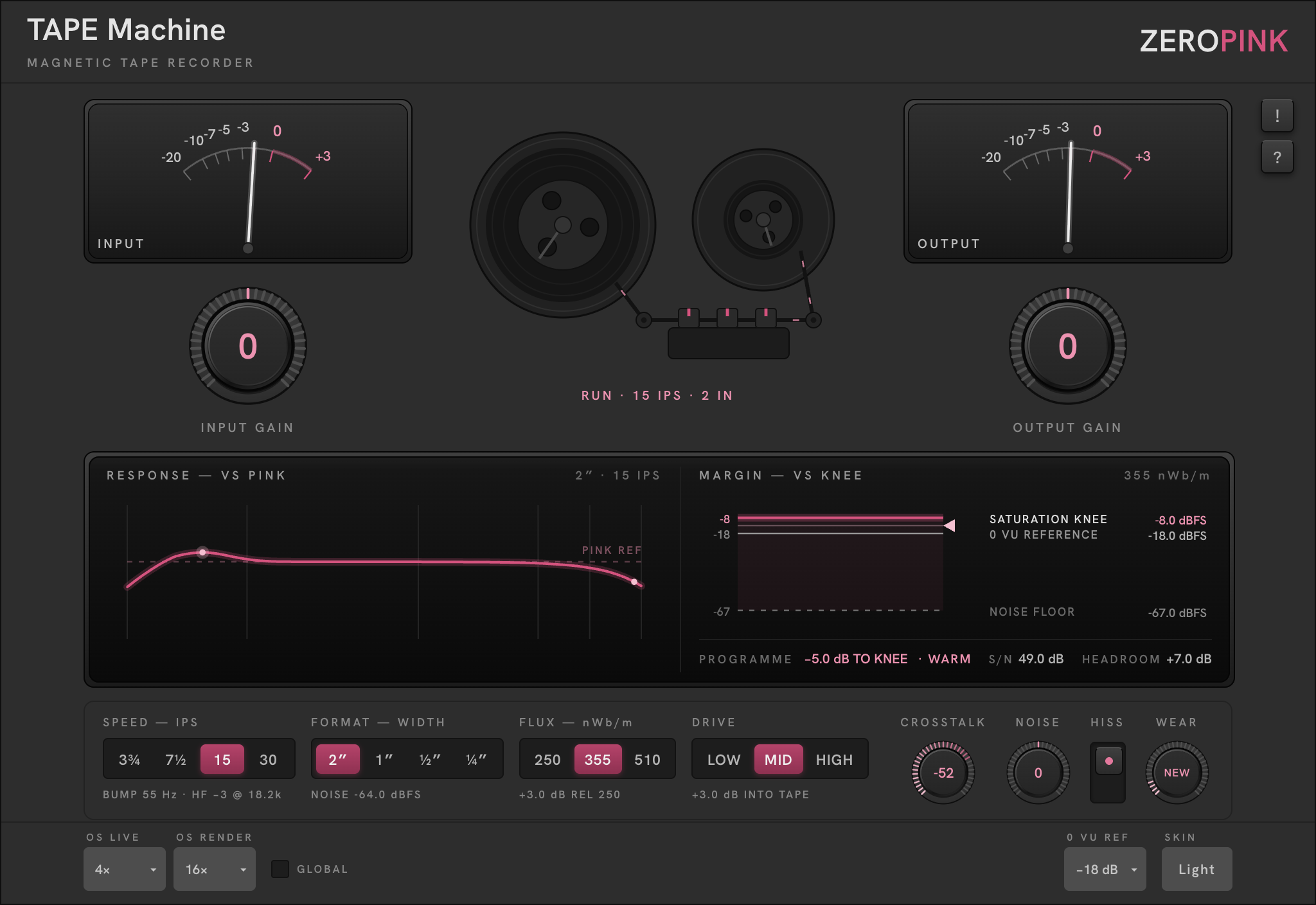
Play the loudest section of the part. Bring the INPUT needle to around 0 VU — clip gain in your DAW first, INPUT GAIN on the plugin for the trim. Only then choose your machine — SPEED, FORMAT, FLUX — and push with DRIVE.
INPUT GAIN and OUTPUT GAIN live under their own needles in the bays, because the meter and the control that moves it are one gesture. Both are Zero Detent knobs — they snap to unity, and the engraved 0 ignites when you land on it.
Once staged, the MARGIN pane takes over. Its PROGRAMME readout obeys the suite-wide VS REF law — distance to a named target, never a raw number:
That reads: your programme is riding 4.2 dB below the point where the tape starts to give. Push DRIVE — or the signal itself — and watch the state word walk CLEAN → WARM → SAT. The needles own 0 VU; the glass owns the knee. Two named targets, two instruments, no duplication.
Stage once, properly, and PROGRAMME becomes the only level readout you need for the rest of the session.
The whole machine,
on the glass.
A bespoke recording and mastering tape machine. For half a century, tape was the record — the weight in the low end, the rounded transients, the top that stays sweet as it gets loud. That sound isn’t nostalgia; it’s physics: head bump, gap loss, format noise, operating level, and the behaviour of a transport in motion. TAPE Machine carries the whole machine.
What the classics could never give you is what this one adds: digital control and precision. A tape machine’s response deviation is a spectral shape, and its operating level is a level target — both readable against the references you already know, the pink contour and the 0 VU mark. Where the hardware asked you to trust your ears and a maintenance log, this machine draws what it is doing on the glass, exactly, live.
It emulates no specific unit. The familiar sound comes from the mechanism, not any one manufacturer’s circuit — so you get the sound every record taught you to expect, with none of the drift you had to live with.
Mix-bus glue, mastering colour, drums and bass that need weight, vocals that need the top rounded rather than dulled. Anything where the question is “what would the tape do” — because here you can watch it do it.
Slower tape means the head bump sits higher in the bass and the top end falls earlier. Wider tape means a lower noise floor. Hotter flux raises the saturation knee — more headroom. DRIVE pushes the programme into the tape, trading headroom for signal-to-noise, dB for dB. Each selector prints its consequence directly beneath it — the plugin teaches itself with no manual open.
Two displays, one story.
The response pane tells you what the machine does to tone; the margin pane tells you what it does to level. Between them, nothing the tape does is invisible.
Response — VS PINK
The machine’s own frequency response drawn against the pink reference contour, 20 Hz–20 kHz. The solid pink trace is the hero; the dashed line is the reference. The two dots mark the head bump and the −3 dB corner — their figures print under the SPEED selector. Change SPEED or FORMAT and the outgoing curve persists for a moment as a dim dashed trace while the new one settles — go 15 → 30 and you watch the bump walk out from under the bass rather than being told about it. Hover anywhere on the plot and a hairline follows the cursor with the exact frequency and deviation at that point.
Margin — VS KNEE
The operating-level ladder in dBFS. Three lines: the saturation knee (pink, where the tape starts to give), the 0 VU reference (the anchor, not the subject) and the noise floor (dashed — the tape’s own floor from format + speed, moved by the NOISE trim and pulled down by DRIVE’s compensation). The shaded window between knee and floor is your usable range. The live marker is your programme riding the ladder toward the knee; the readout row beneath prints PROGRAMME, S/N and HEADROOM.
Physical facts first,
then calibration, then colour.
Left to right in derivation order — the line under each selector prints its consequence.
The reels are information.
The take-up reel turns faster than the supply reel because its pack is smaller — the one piece of reel physics that is actually true and that nobody models. Rotation rate reads off SPEED: the motion confirms a setting, it does not decorate the plate. The tape path leaves the supply pack, passes the three head faces — erase, record, repro, their gaps picked out in pink — and returns to the take-up pack.
The readout beneath states the machine: RUN · 15 IPS · 2 IN. The metering deliberately outranks the transport — the bays are the tallest objects on the plate, the reels sit between them at reduced scale. Level is what you work with; the transport confirms the machine you chose.
Three machines to start from.
Bump at 110 Hz is barely there, top stays open, floor is academic. Ride CLEAN, never past WARM. WEAR at NEW.
The 55 Hz bump sits under the kick; ride WARM and let the knee round the transients. HISS off if the bed reads.
Early HF corner, audible floor, the knee doing real work. WEAR toward WORN for flutter and drift. The machine, misused on purpose.
Everything else lives in one row.
OS Live / OS Render
Oversampling while you play and for offline bounces — up to 16× live, 128× render. GLOBAL applies the choice to every ZEROPINK plugin in the session.
0 VU Ref · Skin
0 VU REF calibrates what dBFS the needles and the MARGIN ladder call 0 VU — −18 is the usual modern reference. SKIN — graphite or satin-metal; cosmetic parity, nothing else changes.
Help
The ! cap latches hover tooltips over every control; the ? cap opens the manual. The ZEROPINK wordmark opens zeropink.net — or your license details once activated; the trial pill opens the license panel.
Thirty days, nothing held back.
Every install starts a 30-day trial — nothing held back, no account needed. The pill in the nameplate counts it down; days first, then hours as it runs out.
To buy: click the pill, then BUY — the checkout opens in your browser. Your license key arrives by email. To activate: click the pill, paste the key into ENTER LICENSE, done. One key, all your machines. Once activated the pill disappears; the ZEROPINK wordmark then shows your license details, and DEAUTHORIZE releases the seat for another machine.
Lost your licence? Retrieve it from My Account — enter the address you purchased with and it is sent again.