ZEROPINK | GraphEQ
Before anything else:
get to ZERO.
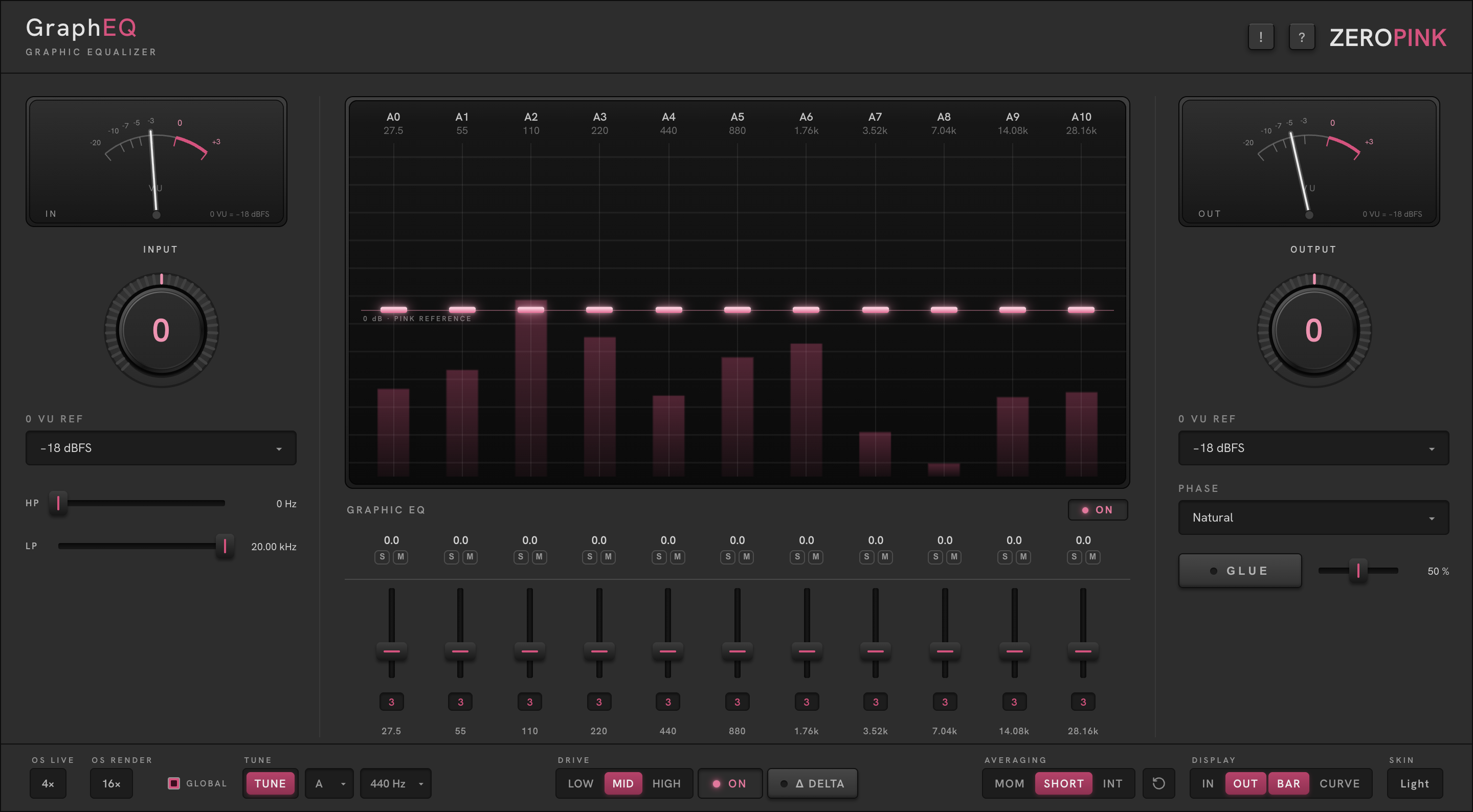
The needles are calibrated to 0 VU — −18 dBFS by default, adjustable per meter under each VU. Bring the IN needle to ride around 0 VU with INPUT, shape, then trim OUTPUT until the OUT needle matches — so you judge tone, not loudness.
Both knobs are Zero Detent: they snap to unity, and the centre figure reads 0 when you land on it. Stage your level first; shape second.
The frame is familiar — the same grammar as every plugin in the suite: IN and OUT needles calibrated to 0 VU, Zero Detent gain knobs beneath them, HP/LP cut filters, phase mode, and a GLUE stage after the EQ.
An equalizer only tells the truth about a signal at the level it was designed to hear. Get to zero first, and every node means what it says.
A graphic equalizer with one idea the classics never had:
the bands sit on your song’s notes.
Set TUNE to the key of the track and all eleven bands land on that note’s octaves — from the lowest playable instance up through the air band. Boost a band and you are boosting the root, an octave of it, every time.
Eleven octave bands, ±12 dB each, drawn as nodes on the glass over a live analyser reading against the pink reference — so you can see what the programme is doing at each band while you move it. Solo or mute any band from the deck below the glass to hear exactly what you are shaping.
Under every EQ band sits a matching saturation slider — per-band drive with a selectable 2nd or 3rd harmonic. Tone and colour live on the same octave ladder, band by band.
Musical, broad-stroke tone shaping that stays in key — lifting the root of a bass line through the octaves, opening the top of a mix, adding per-band harmonic weight where the song lives.
Surgical notching or de-essing. Octave bands are broad by design — reach for a parametric when you need a scalpel.
Eleven bands on the key.
Each column is one octave of the song’s key — note name and exact frequency printed at the top. Change KEY or PITCH in the footer and the whole ladder retunes: labels, frequencies, analyser columns, and the saturation deck all move together.
The band ladder
Drag a node ±12 dB; double-click returns it to 0. The pink line at centre is the 0 dB pink reference — flat against pink, not flat against silence.
The analyser
The live spectrum draws behind the nodes, one column per band. DISPLAY in the footer picks the signal — IN, OUT, or both: input in white, output in pink — and the drawing: BAR, CURVE, or both.
Averaging
MOM for what is happening now, SHORT for phrases, INT for the whole programme; the ↻ button restarts the average.
Cut with EQ. Fill with drive.
Below each EQ band: a metal slider setting how hard that octave is driven, and a small selector choosing the 2nd or 3rd harmonic. ⌘-drag any slider to move all eleven together; ⌘-click an order button to set them all.
The footer DRIVE switch (LOW · MID · HIGH) scales the whole stage; ON engages it and Δ DELTA monitors only what the saturation adds — the honest way to judge colour.
Working against the analyser: when a band reads over the pink reference, cut it with the EQ node; when it reads under, reach for that band’s saturation drive first — the added harmonics fill the octave with weight a boost alone can’t give. Cut with EQ, fill with drive.
HP / LP — cut filters outside the band deck, for rumble below and hiss above the music. PHASE — Minimum, Natural or Linear filter behaviour. GLUE — a gentle compression stage after the EQ, with an amount fader.
S and M under each band solo or mute that octave in the monitor path — never printed to the output.
Everything else lives in one row.
Tune · Key · Pitch
The heart of the plugin. The TUNE cap engages key-tracking, KEY picks the note, PITCH sets the concert reference (440 or 432 Hz). Every stepped ladder on the plate follows.
OS Live / OS Render
Oversampling while you play and for offline bounces. GLOBAL applies the choice to every ZEROPINK plugin in the session.
Averaging · Display · Skin
Analyser ballistics and drawing, described with the glass. SKIN — graphite or satin-metal; cosmetic parity, nothing else changes. The ! cap in the nameplate latches hover tooltips over every control; the ? cap opens the manual.
Three ways in.
TUNE to the song’s key. Lift the two lowest bands +2 to +3 dB, add 2nd-harmonic saturation on the same bands. Solo them to hear the root breathe.
±1.5 dB at the extremes, flat in the mids, AVERAGING on INT and DISPLAY on OUT — watch the curve settle against pink before you commit.
Bands flat. Raise saturation density across the low mids, 3rd harmonic, DRIVE MID, Δ DELTA to audition what it adds. Weight with no boost.
Thirty days, nothing held back.
Every install starts a 30-day trial — nothing held back, no account needed. To buy: the checkout opens in your browser and your license key arrives by email.
To activate: paste the key into ENTER LICENSE. The plugin itself never touches the network — activation and checkout run through your browser, never inside the audio process. The wordmark opens zeropink.net.
Lost your licence? Retrieve it from My Account — enter the address you purchased with and it is sent again.