ZEROPINK | OPTO Comp
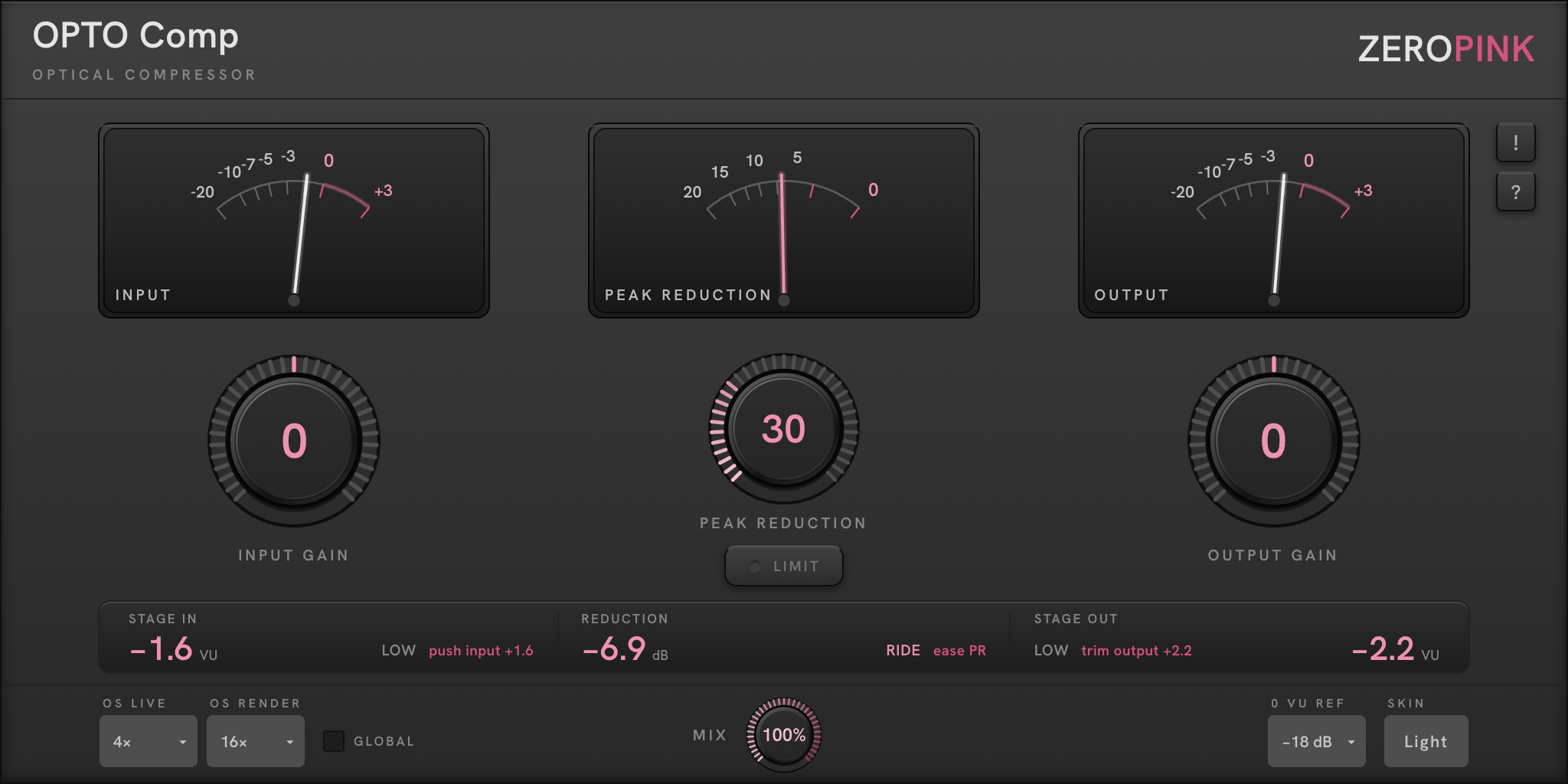
Before anything else:
get to zero.
OPTO Comp assumes you have set your level before you start compressing. That is not housekeeping — it is the whole method, and every ZEROPINK plugin is built around it.
0 VU = −18 dBFS. That is the reference the meters are calibrated to, and it is where analogue equipment expects to be fed. Modern digital sessions routinely run 15–20 dB hotter than this, which is why compressors that sound effortless on one engineer's mix sound crushed and lifeless on another's. Same plugin, different starting level.
- Play the loudest section of the part.
- Bring the INPUT needle to around 0 VU — clip gain in your DAW is the better fix; INPUT GAIN on the plugin is for trimming from there.
- Only then reach for PEAK REDUCTION.
The STAGE IN readout tells you exactly how far off you are and what to do about it. It does not report a number and leave you to interpret it — it names the state and prescribes the correction:
That reads: you are 5 dB below reference, and the fix is to add 5 dB of input gain. When you land, the state word changes and the prescription disappears.
Do this once, properly, and the compressor's controls will behave the way their labels suggest. Skip it and you will spend the session fighting the ratio.
Light, a photocell,
and no ratio control.
The LA-2A’s optical circuit — the compressor that has carried lead vocals for sixty years. Signal drives a light source, a photocell answers, and gain falls. The photocell is slow and slightly imperfect, and those imperfections are the sound — rebuilt here with precise digital control.
It is program-dependent. The photocell releases quickly at first, then slows as it settles — always responding to what came just before. That is why it breathes with the music instead of pumping against it.
It has no ratio control — the hardware never did. Ratio emerges from the photocell’s own curve: push harder and it rises on its own. The legacy is honest, down to the missing knob.
Vocals, bass, acoustic guitar, program material, drum busses — anything where you want the level held without hearing it being held. It is a smoothing tool. It rounds and settles.
Catching fast transients. The optical attack is unhurried by design — a snare's crack is gone before the cell responds. That is FET territory. Using OPTO Comp for it lowers everything after the transient, which usually makes it stick out more, not less.
Three needles, one grammar.
All three are true VU — around 300 ms integration, IEC/ASA ballistics. They read musical level, not sample peaks. IN and OUT share one scale, with the stretch above 0 marked in pink — a region, not a warning light.
Input
Level arriving at the compressor, after INPUT GAIN. This is the one you set first. Target 0 VU — then INPUT GAIN becomes your drive control: more input means more reduction and a steeper effective ratio, from the same physical mechanism.
Peak Reduction
How much gain is being removed, reading right to left from 0. The needle should move like a musician breathing, not twitching. If it is slamming and holding, you are asking too much of an optical circuit.
Output
Level leaving the plugin, after OUTPUT GAIN. When the compressor is set well and output gain is matched, this needle sits around 0 VU alongside the input needle — and bypass becomes an honest comparison.
Beneath the meters, the STAGE row names your position against reference and prescribes the exact correction — each stage against its own control:

KISS · RIDE · DEEP · CRUSH
The REDUCTION readout names how hard the compressor is working — a four-state ladder, each state fixed to an amount of gain reduction. The prescription beside the state tells you which way to go: ease PR to back off, or its counterpart to push further.
LIMIT steepens the effective ratio toward brick-wall behaviour — the steep end of the optical curve without a ratio control existing. Use it when you need a ceiling held rather than a level shaped.
Oversampling, split for a reason.
OS Live / OS Render
Oversampling for the nonlinear stage, set independently for playback and export. Work at 4× — low latency, light CPU, audibly fine — and let the render setting (16× default) take over on export, where the extra passes cost you nothing but time. You never choose between a responsive session and a clean master.
Global · Mix · 0 VU Ref
GLOBAL applies the oversampling choice across every ZEROPINK plugin in the session. MIX is a parallel blend — New York–style compression without a second bus; try heavy reduction at 30–50% on drums. 0 VU REF moves the reference for percussive, high-crest sources: −18 default, −21 / −24 / −27 / −30 selectable.
Why oversample at all
A compressor is a nonlinear process — it creates harmonics that were not in the input. Above Nyquist they cannot exist, so they fold back into the audible band at unmusical intervals. Oversampling raises the rate before the nonlinear stage so new harmonics land where they belong, then filters and returns to the session rate with nothing left to fold.
Thirty days, nothing held back.
OPTO Comp installs as a fully functional 30-day trial from one installer — nothing disabled, nothing muted, no noise injected. When the trial ends the plugin outputs silence and shows a banner; your session, settings and automation are preserved, and entering a licence restores audio immediately, exactly where you left off.
Purchase delivers a licence key by email — paste it into the plugin's licence dialogue. Entering it needs a connection once; from then on the plugin works offline, re-checking quietly in the background and carrying on regardless if it cannot reach the server. A licence check never interrupts a session. One licence covers more than one machine, and Deauthorize frees a slot so you can move to another.
Lost your licence? Retrieve it from My Account — enter the address you purchased with and it is sent again. The 30-day trial download above is direct; no email required.