ZEROPINK | ProgramEQ
Before anything else:
get to ZERO.
ProgramEQ assumes you have set your level before you start shaping tone. That is not housekeeping — it is the whole method, and every ZEROPINK plugin is built around it.
0 VU = −18 dBFS. That is the reference the meters are calibrated to, and it is where analogue-style curves behave the way they were designed to. Feed the plugin 15 dB hotter and every boost lands on a signal that is already leaning on the ceiling.
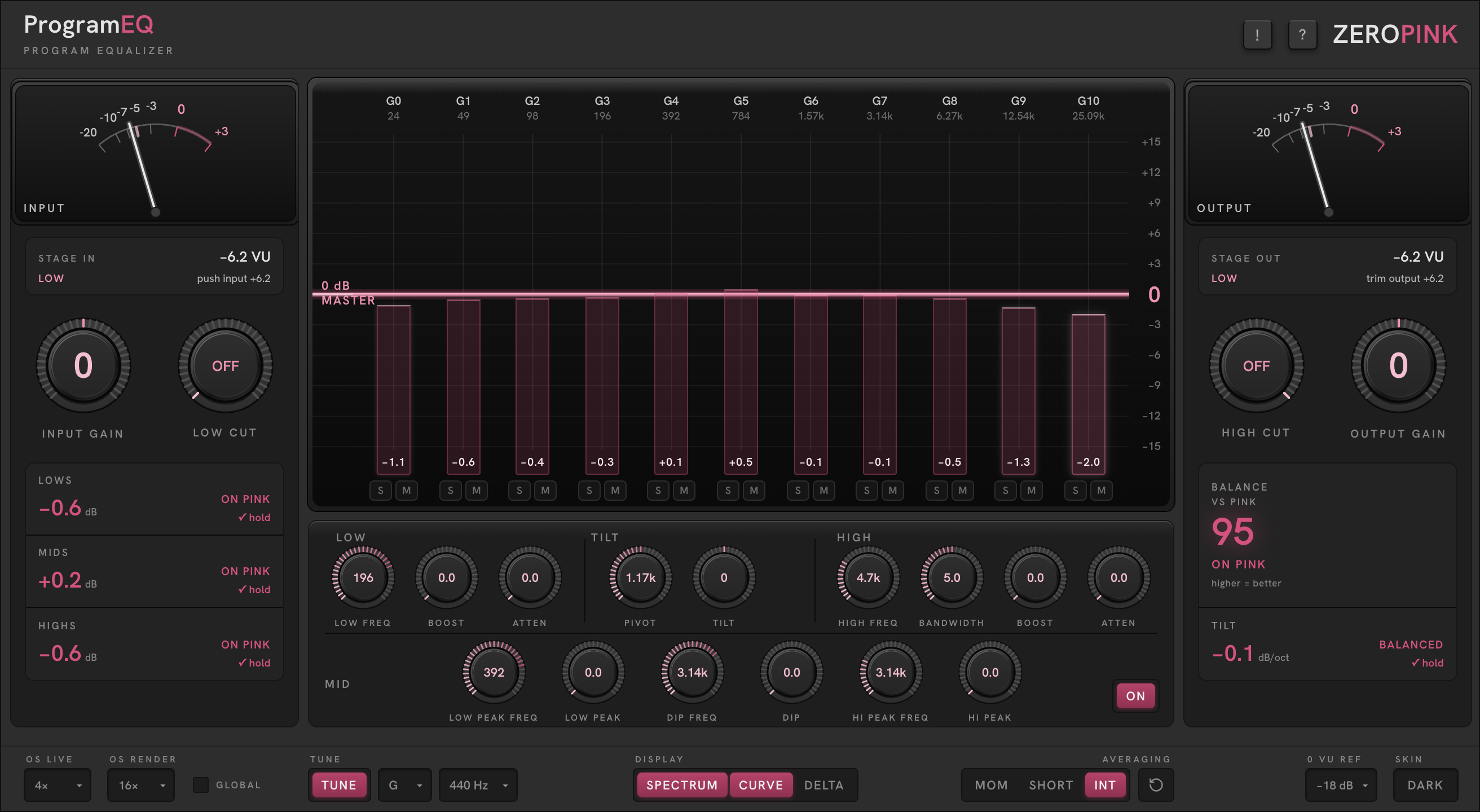
Set INPUT GAIN until the IN needle rides around 0 VU on the loud parts. The STAGE IN readout under the meter prescribes the exact move — push or trim, and by how much. When it says ON TARGET, start equalizing.
The STAGE IN readout names your position against reference and prescribes the correction — the same grammar as every meter in the suite:
An equalizer only tells the truth about a signal at the level it was designed to hear. Get to zero first, and every curve means what it says.
The classic program equalizer,
tuned to the song.
An interpretation of the classic program equalizer — the broad-stroke tone shaper that has finished records for seventy years — built for full mixes and complex multi-instrument programme, where musical corners beat surgical moves. Rebuilt with precise digital control, and one idea the hardware never had: every frequency tuned to the song\u2019s key.
TILT comes first, deliberately. It is the broadest gesture in the plugin — set the overall light balance of the programme before any surgical work, and everything downstream reacts to an already-balanced signal.
Boost and atten are separate knobs, exactly like the hardware this section interprets. The two curves are different shapes at different frequencies, they never cancel — run them together and you get the famous trick: a full, lifted low end with a scoop above it that keeps the low mids from clouding.
Full mixes, busses, mastering moves and any complex programme where the question is the overall shape of the record: light balance, low-end foundation, presence and air. The famous boost-and-atten low end, the flat tilt, and a glass that scores the result against the pink reference while you work.
INPUT GAIN → TILT → LOW CUT · HIGH CUT → LOW · HIGH PROGRAM EQ → MID → OUTPUT GAIN
Everything you hear is what renders. The only exceptions are the monitor-path tools — band SOLO/MUTE and the one-octave probe — which never print. The ON/OFF switch is a true bypass of the EQ stages: gain staging stays live, so bypassing compares tone, not loudness.
An equalizer in the key of the song.
This is the idea the rest of the plugin hangs off. With TUNE engaged, every stepped frequency ladder re-snaps to the nearest root or fifth of the song\u2019s key. Boost 98 Hz in G and you are boosting G — not \u201Csomewhere near 100\u201D. LOW FREQ and the MID ladders snap to roots only — in G: 24.5, 49, 98, 196, 392 Hz — never the fifth.
The analyser follows: the eleven octave columns sit exactly on the key\u2019s notes, so a bar that reads hot IS a note in your song, and the EQ ladders land on the same frequencies the bars measure. Every tuned knob shows its note under the value.
Pick the key in the footer. The list runs E to E — thirteen entries; the second E anchors the ladder an octave up (41 Hz) for material with no true sub. PITCH switches the concert reference between 440 and 432 Hz. Switch TUNE off and the ladders return to their classic printed values.
The mid section works the same way: all three of its ladders are octave-spaced and snap to the key\u2019s octaves, so a dip at \u201C500\u201D in G is really a dip at 392 or 784 — on the note, where the energy actually is.
Eleven bars, one pink line.
The analyser applies the master contour, so the pink line is the target: flat against it is what a finished record reads, not raw pink noise. 0 dB on the line means that octave sits exactly where a finished master sits.
The bars
Eleven octave bands show the programme’s energy as deviation from the reference. Bars heat up — lighter, brighter pink — the further they stray. With TUNE engaged the columns sit exactly on the key’s notes.
The pink curve
Your EQ — the composite response of every stage. Hover anywhere in the glass and a readout follows the pointer: frequency, nearest tuned note, the dB at the pointer, and what your EQ does there.
The probe
⌘-click opens a one-octave band-pass around the pointer. Drag to sweep it — the fastest way to find which instrument owns a bump. S / M under each bar solo or mute that octave in the monitor path. Monitor only; never printed.
Broad strokes, musical corners.
The amounts are the classic 0–10 sweeps, not dB — the curves are non-linear, fit to hardware transfer measurements. Watch the pink curve in the glass; it tells the truth.
Two needles, and a score.
True-VU needles with the classic ~300 ms ballistics and a slow-decay peak pip — the same law as every meter in the suite. The cards are measurements of the programme, not of your EQ: they respond to what is actually happening at the output.
In
True-VU needle with peak pip, STAGE IN prescription beneath. The LOWS / MIDS / HIGHS cards read the measured spectrum against the target and prescribe the move: pull, add, or hold.
Out
The same VU after the EQ, with STAGE OUT beneath — match it to STAGE IN and bypass compares tone, not loudness.
Balance and Tilt
BALANCE VS PINK scores the programme 0–100 against the reference — higher is better, ON PINK is the goal. The TILT card measures the actual spectral slope and reads TOO BRIGHT, BALANCED or TOO DARK with a prescribed correction in dB/oct.
When BALANCE reads ON PINK and STAGE OUT matches STAGE IN, the record is balanced and the comparison is honest.
Everything else lives in one row.
OS Live / OS Render
Oversampling while you play (2×–16×) and for offline bounces (Off–128×). GLOBAL applies the choice to every ZEROPINK plugin in the session. Live oversampling is always engaged, which is why all eleven analyser bands are always drawn — there is no Nyquist greying.
Averaging · 0 VU Ref · Skin
AVERAGING sets the octave bars\u2019 ballistics: MOM, SHORT, or INT — integrated over the whole programme, the default and the one to trust for balance decisions. 0 VU REF recalibrates what dBFS the meters call zero: −18 by default, down to −30 for large-format sessions. SKIN — Dark or Light chassis; glass, meters and the pink ramp carry over unchanged.
Tune · Key · Pitch · Display
The tuning system, left-aligned under the glass. DISPLAY toggles the SPECTRUM, CURVE and DELTA layers; the pink reference is always on, and DELTA fills the area between your curve and the target.
Thirty days, nothing held back.
ProgramEQ runs fully featured for 30 days from one installer. A countdown pill sits in the header; at day zero the plugin silences until licensed — your session, settings and automation are preserved, and licensing restores audio exactly where you left off.
To activate: click the pill, paste the key from your purchase email, and press ACTIVATE. The plugin itself never touches the network — activation and checkout run through your browser, never inside the audio process.
Lost your licence? Retrieve it from My Account — enter the address you purchased with and it is sent again.